Overview
High-Level Architecture
The High Performance Computing Cluster is run and managed by DACS. The cluster supports both teaching and research activities by providing a scalable environment for running computationally intensive applications, data analysis workflows, simulations, and parallel computing workloads.
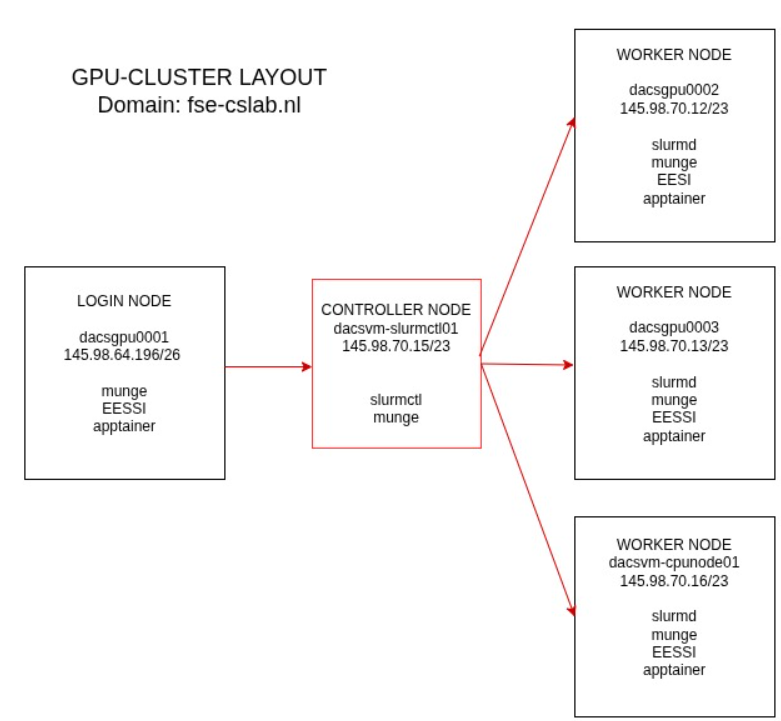
Cluster specifications
| Node | Type | Resources | Comment |
|---|---|---|---|
| dacsgpu001 | Login node | AMD EPYC 9354 32-Core / 64 threads / 768 GB / 3 x L40 | Physical server |
| dacsgpu002 | Worker node | AMD EPYC 9354 32-Core / 64 threads / 768 GB / 4 x L40 | Physical server |
| dacsgpu003 | Worker node | AMD EPYC 9354 32-Core / 64 threads / 768 GB / 4 x L40 | Physical server |
| dacsvm-cpunode01 | Worker node | 32 cores / 256 GB | Virtual Machine |
| dacsvm-slurmctl01 | Controllernode | Virtual Machine |
Login node
- User login
- File manipulation and job script preparation
- Local testing
Worker node
- Runs slurmd
- Executes tasks and returns status to the controller
Controller node
- Runs slurmctld
- Schedules jobs
- Monitors resources
- Manages the job queue
- Allocates resources
Key Components
Slurm
What is slurm ?
Slurm is a job scheduler used on many HPC systems. One does not normally run jobs directly on a login node. Instead, one submits a job trough Slurm and requests resources. Slurm will allocate these resources once they are available and will then run the job.
Official documentation can be found here
Slurm partitions
In Slurm, partitions are logical groupings of compute nodes that act as job queues. Each partition has specific constraints, such as job size limits, maximum wall-clock time, allowed users, and hardware types.
There are 2 partitions: Education and Research
The education partition is intended exclusively for students during lab sessions. Jobs submitted to this partition receive a higher scheduling priority. It is also important to note that the maximum runtime for jobs in the education partition is limited to 2 hours.
The research partition is intended for use by both staff and students. All workloads that are not associated with scheduled lab sessions are executed in this partition. Currently, no usage restrictions or scheduling policies have been configured for the research partition.
carlo@dacsgpu0001:~$ sinfo
PARTITION  AVAIL  TIMELIMIT  NODES  STATE NODELIST
education*    up    2:00:00      3    mix dacsgpu0002.fse-cslab.nl,dacsgpu0003.fse-cslab.nl,dacsvm-cpunode01.fse-cslab.nl
research      up 7-00:00:00      3    mix dacsgpu0002.fse-cslab.nl,dacsgpu0003.fse-cslab.nl,dacsvm-cpunode01.fse-cslab.nl
Slurm Accounts
A Slurm account is an organizational grouping used to track and manage computing resource usage, fairshare priorities, and budget limits. Unlike your individual username, a Slurm account typically represents a research group, department, or project to dictate how compute allocations are spent.
There are 2 accounts: Education and research
To submit jobs to the cluster, you must be a member of either the education or research account.
Please note that access to partitions is restricted based on account membership. Only members of the education account can submit jobs to the education partition, while only members of the research account can submit jobs to the research partition. During the registration process, users are assigned to the appropriate account based on their intended use of the cluster.
Slurm Reservations
Slurm reservations allow system operators and administrators to reserve specific compute resources for a defined period of time and for designated users or user groups.
Currently, reservations are created during lab sessions to ensure that sufficient compute resources are available for students during their lab.
To list all reservations run the command: scontrol show reservations
EESSI
Pronounced "easy", this is a collaborative High-Performance Computing (HPC) project among European partners aimed at building a common stack of scientific software.
- Purpose: It provides a ready-to-use, highly optimized stack of scientific software that works seamlessly across supercomputers, cloud instances, and local workstations.
- Benefits: It eliminates the need to compile and install complex software from scratch across multiple systems without sacrificing computational performance.
- Learn More: Check out the Official EESSI Website.
Apptainer
Apptainer (formerly known as Singularity) is a free, open-source container platform explicitly designed for high-performance computing (HPC) and scientific workloads. It allows unprivileged users to securely run complex software stacks without requiring root access or administrative privileges on shared systems.
Key Features
- Security & HPC Focus: Unlike Docker, Apptainer treats the user inside the container as the same user outside, prohibiting privilege escalation and securing shared computing resources.
- Single-File Format: Containers are packaged into a single, immutable Singularity Image Format (SIF) file, making them highly portable and easy to share across servers or clusters.
- Native Integration: It integrates seamlessly with host resources like GPUs, high-speed networks, and parallel file systems rather than heavily isolating them.
- Docker Compatibility: Apptainer can natively pull and execute containers from standard OCI registries (such as Docker Hub or NVIDIA NGC) without needing the Docker daemon running on your machine.
- Learn More: Check out the Official Apptainer Website.